




















Location intelligence

Every store of the 22 apps, refreshed every week.

Where each store is, its hours, its delivery promise and every other detail we have, on a map. And what changed since the week before: new stores, closed stores and stores that moved.

₹25,000 a month, or ₹35,000 one time, GST included. A product of its own on Shelf: take it with any plan, or alone.

The Locations overview in Shelf: the stores on each app as bars, and this week’s new stores app by app.
Location intelligence in Shelf: the stores on each app, and this week’s new stores, app by app.

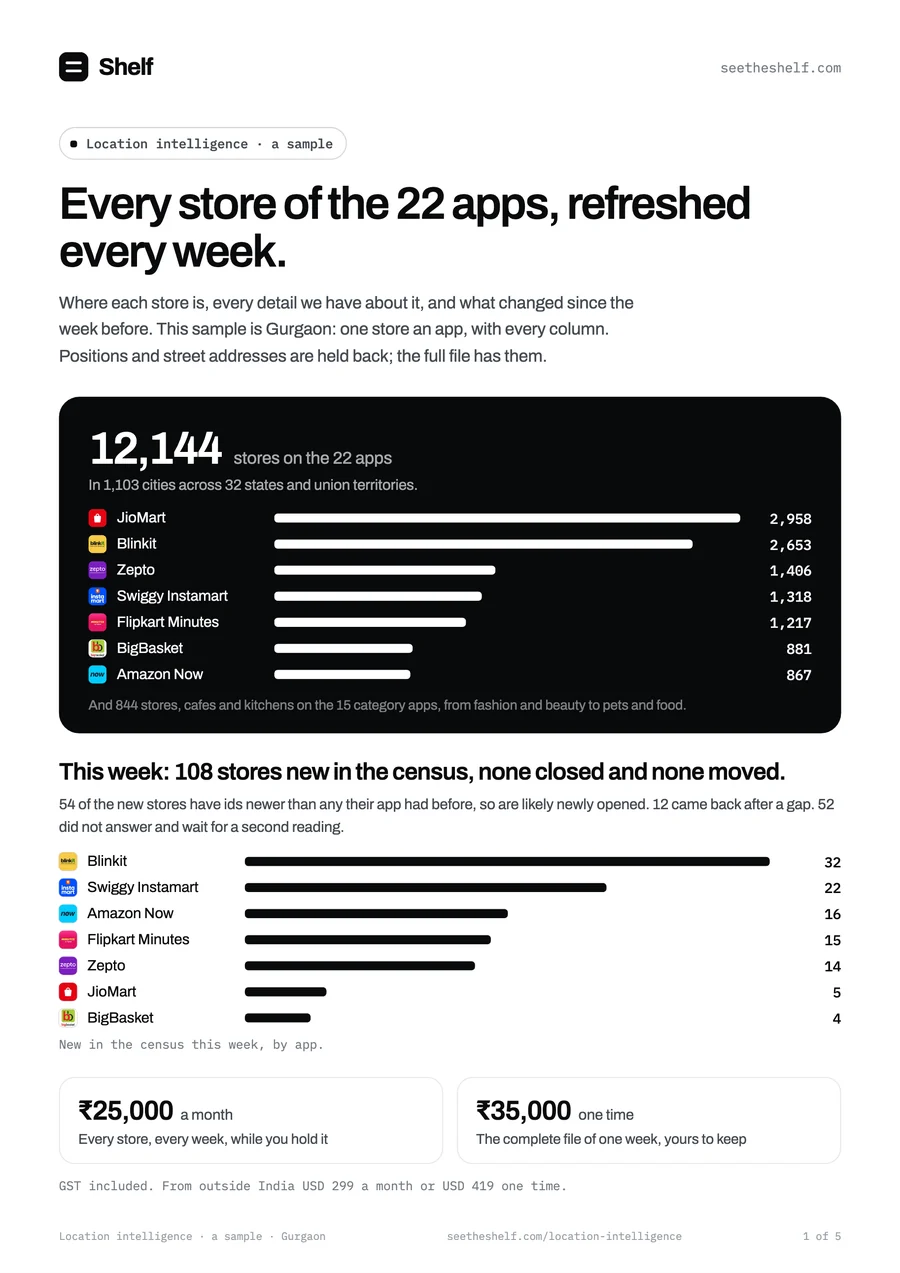
12,144stores on the 22 apps

In 1,103 cities across 32 states and union territories.

  • Blinkit Blinkit: 2,653 stores
  • Zepto Zepto: 1,406 stores
  • Swiggy Instamart Swiggy Instamart: 1,318 stores
  • Flipkart Minutes Flipkart Minutes: 1,217 stores
  • BigBasket BigBasket: 881 stores
  • Amazon Now Amazon Now: 867 stores
  • JioMart JioMart: 2,958 stores
  • FirstClub FirstClub: 34 stores
  • Myntra M-Now Myntra M-Now: 83 stores
  • Slikk Slikk: 6 stores
  • ZILO ZILO: 6 stores
  • KNOT KNOT: 3 stores
  • Nykaa Now Nykaa Now: 102 stores
  • Zepto Pharmacy Zepto Pharmacy: 72 stores
  • Plazza Plazza: 9 stores
  • Supertails Supertails: 44 stores
  • OZi OZi: 8 stores
  • Peeko Peeko: 3 stores
  • Zepto Cafe Zepto Cafe: 281 stores
  • Bistro Bistro: 77 stores
  • Swish Swish: 71 stores
  • DMart Ready DMart Ready: 45 stores

What changed

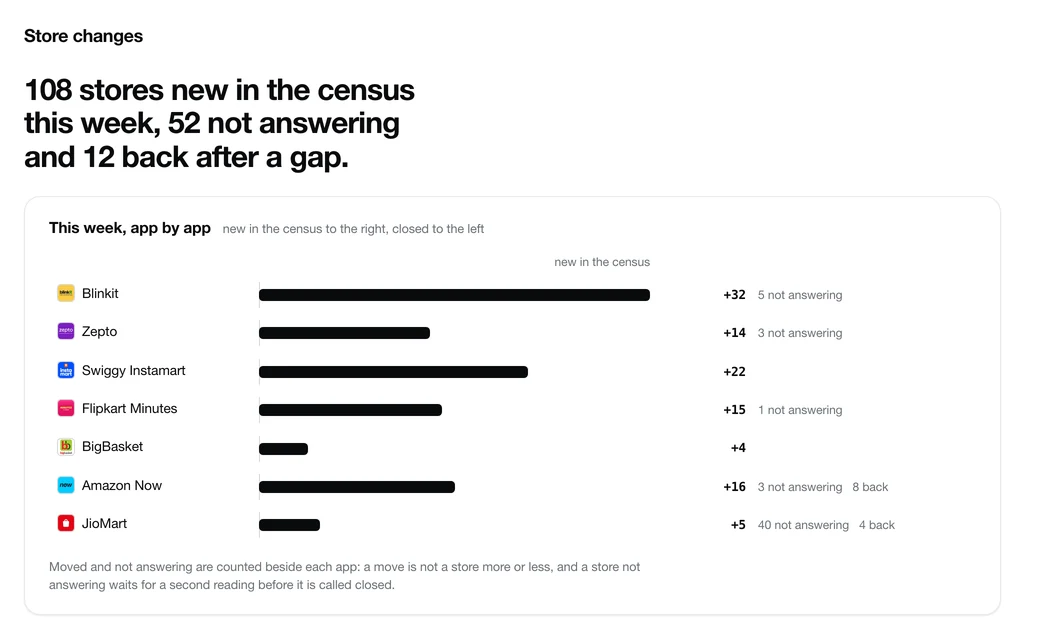
This week: 108 stores new in the census, none closed and none moved.

54 of the new stores have ids newer than any their app had before, so are likely newly opened. 12 stores came back after a gap. 52 did not answer and wait for a second reading.

Each week the stores are set against the week before, and the screens list every change store by store, with the week it happened. The grocery apps are counted again every week, the category apps once a month for now.

  • New is a store in this week’s list that was not in last week’s. When its id is newer than any the app had before, it is likely newly opened.
  • Closed means two readings on different days agree the store is gone. Until the second, it is not answering.
  • Moved is a changed position, given with its distance: a move, or a sharper reading of the same store.
  • Back is a store on the list again after a gap.
Blinkit New: 32Back: noneNot answering: 5
Swiggy Instamart New: 22Back: noneNot answering: none
Amazon Now New: 16Back: 8Not answering: 3
Flipkart Minutes New: 15Back: noneNot answering: 1
Zepto New: 14Back: noneNot answering: 3
JioMart New: 5Back: 4Not answering: 40
BigBasket New: 4Back: noneNot answering: none

No store closed or moved this week.

In the product

Inside your Shelf account.

Location intelligence opens beside whatever plan you hold: the stores, every change week by week, and the week’s file. In these pictures positions, names and street addresses are blurred; in the product they are shown wherever we have them.

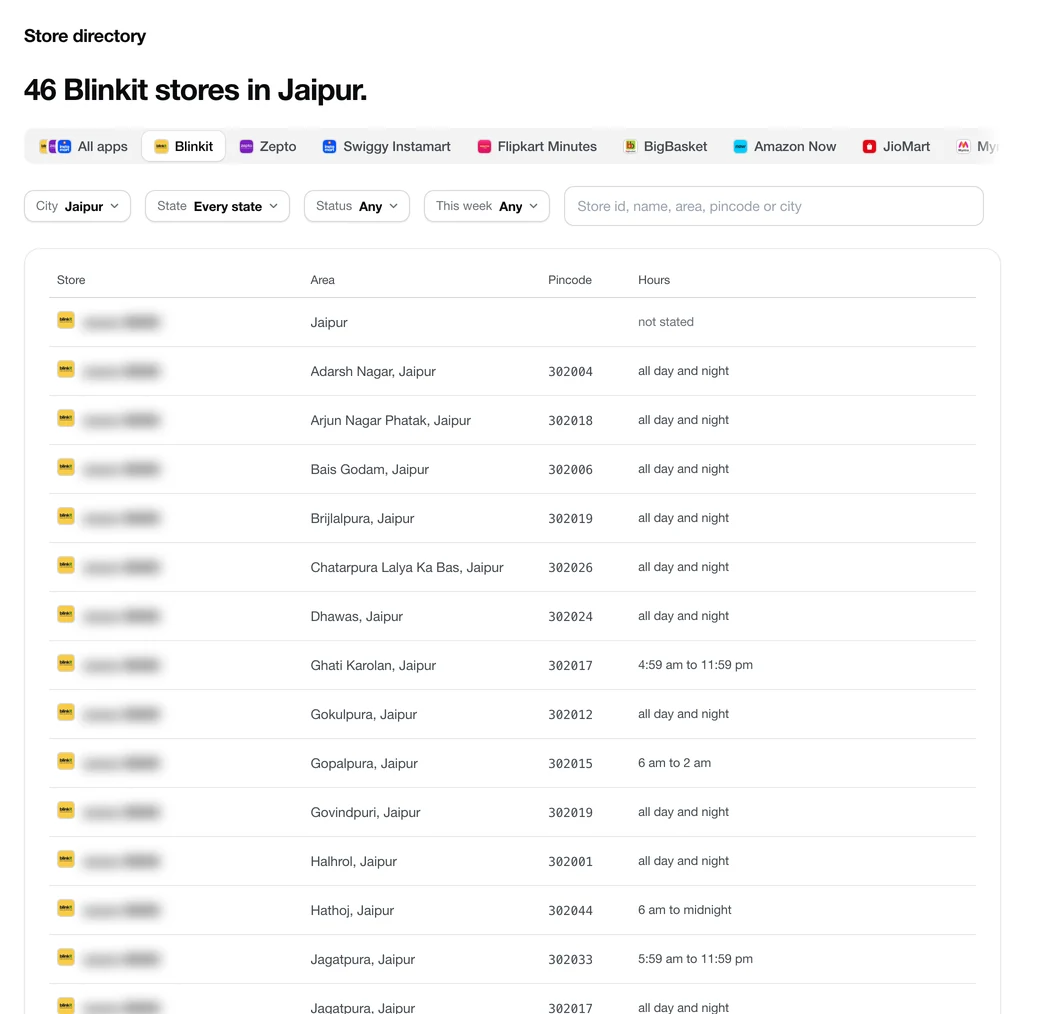
  • The Store directory in Shelf: one app’s stores in one city, each with its area, pincode, hours and status. Store names are blurred here.
    Store directory. Every store of every app, chosen by app, city, state, status and this week’s change.
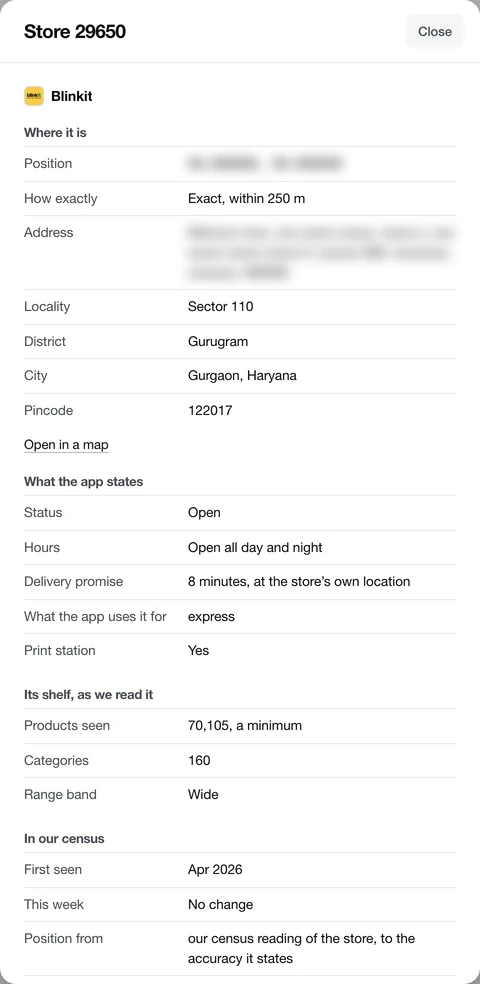
  • A store’s sheet in Shelf: where it is and how exactly, its hours, delivery promise and role, its shelf, and its week in the census. The position and the street address are blurred here.
    A store. Everything we have about one store, on one sheet.
  • Store changes in Shelf: the stores new in the census, back after a gap and not answering this week, app by app.
    Store changes. New in the census, closed, moved, back and not answering, app by app and store by store.
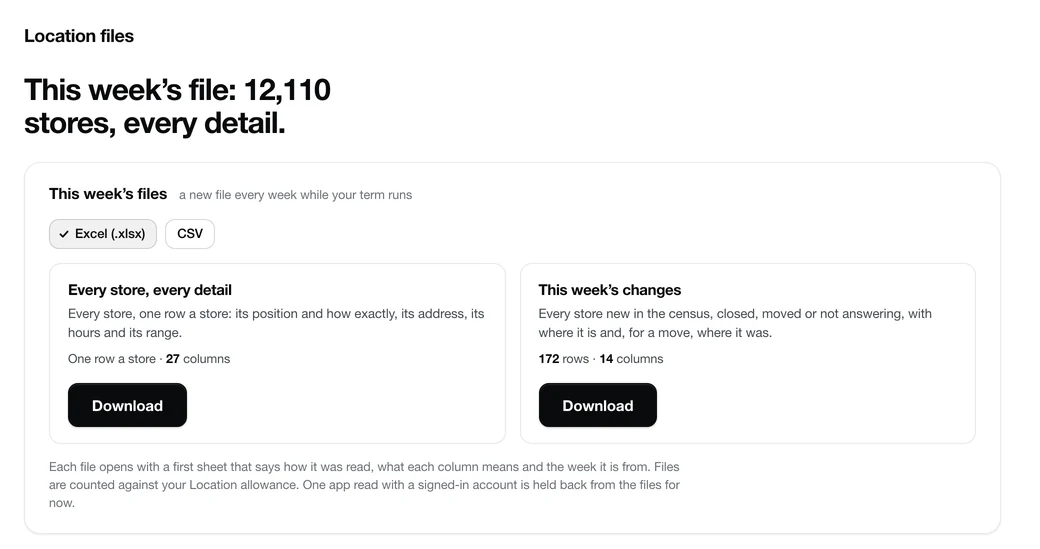
  • Location files in Shelf: this week’s file of every store, and of the week’s changes, in Excel and CSV.
    Location files. This week’s complete file, and the week’s changes, in Excel and CSV.

The columns

Every detail a store carries.

One row a store, the same 30 columns for every app, on the screens and in the file. Where an app does not state a detail, the cell is empty, never a guess.

  • Which store

    One row a store, the same columns for every app.

    App
    The app the store belongs to.
    Store id
    The app’s own id for the store. Every app but FirstClub
    Name
    The app’s own name for the store, where it gives one. A name we made up is never shown. Where the app shows it: Zepto, Amazon Now, JioMart, ZILO, Nykaa Now, Zepto Pharmacy, Supertails, OZi, Peeko, Zepto Cafe, Swish
    Store type
    The kind of store in the app’s own words: an express store, a long-tail hub or one with a pharmacy on Blinkit; Amazon’s own dark store or a partner supermarket on Amazon Now; a grocery or an electronics store on JioMart. Blank where the app does not say. Every app but FirstClub
  • Where it is

    Its position with how precisely it is known, and the place around it.

    Latitude and longitude
    Where the store is, to the precision beside it.Not in the sample Every app but FirstClub
    Position precision
    How closely the position is known: exact is within 250 metres, approximate within one kilometre, and area is further or not yet measured. Every app but FirstClub
    Address
    Given with an exact position only.Not in the sample On these apps: Blinkit, Zepto, Swiggy Instamart, Flipkart Minutes, BigBasket, JioMart, Supertails, Peeko, DMart Ready
    Locality
    The neighbourhood, where the position is exact or approximate. Every app but FirstClub, KNOT, DMart Ready
    District
    The district the store is in. Every app but FirstClub, DMart Ready
    City
    The city the store is filed under, one name across every app. Every app but FirstClub
    State
    The state or union territory. Every app but FirstClub
    Pincode
    The store’s pincode, where the position is exact or approximate. Every app but FirstClub, KNOT
    Delivers to pincodes
    The pincodes the store delivers to, where the app publishes them. Where the app shows it: DMart Ready
    Nearest store of each app
    For every other app, its nearest store and how far: within 1 km, 1 to 3 km, 3 to 5 km or 5 to 10 km. A distance band, never a position. Every app but FirstClub, KNOT
    Position read from
    How the position was read: the app’s own coordinate for the store, our census reading, the centre of the area it delivers to, the distances the app reports, or a public map listing the app confirms. Every app but FirstClub
  • When it is open

    As each app states it.

    Opens
    The opening hour the app gives. Where the app shows it: Blinkit, JioMart, Nykaa Now, Peeko
    Closes
    The closing hour the app gives. Where the app shows it: Blinkit, JioMart, Nykaa Now, Peeko
    Open 24 hours
    Whether the app gives the store as open round the clock. Where the app shows it: Blinkit, JioMart, Nykaa Now, Peeko
    Delivery promise (minutes)
    The delivery time the app promises at the store’s own location. Where the app shows it: Blinkit, Swiggy Instamart
  • What it carries

    From its shelf, read store by store.

    Roles
    What the app uses the store for: its local store, or wider range and pharmacy stock that reaches other places. Where the app shows it: Blinkit, Zepto, Swiggy Instamart
    Print station
    Whether the app prints at the store. Where the app shows it: Blinkit
    Products seen
    Products our shelf read saw listed at the store: a minimum. Every app but Flipkart Minutes, Amazon Now, JioMart, FirstClub, Peeko
    Categories
    Categories with a product at the store in our shelf read: a minimum. Every app but Flipkart Minutes, Amazon Now, JioMart, FirstClub, Peeko
    Range
    How wide its range is against the app’s other fully read stores: compact, standard or wide. On these apps: Blinkit, BigBasket
  • What changed

    Against the week before.

    Status
    Open; not answering, while a second reading is awaited; or closed, once two readings on different days agree. Every app but FirstClub
    First seen
    The first month we held the store: when we first saw it, not when it opened. Every app but FirstClub
    Change this week
    New in the census, moved (with the distance), or back after a gap. On these apps: Blinkit, Zepto, Swiggy Instamart, Flipkart Minutes, BigBasket, Amazon Now, JioMart
    Week of the change
    The week the change was seen. On these apps: Blinkit, Zepto, Swiggy Instamart, Flipkart Minutes, BigBasket, Amazon Now, JioMart
    Moved (metres)
    How far the position moved since the refresh before, in metres: a move, or a sharper reading of the same store.

How precisely each position is known

  • Exact, within 250 metres 11,207
  • Approximate, within one kilometre 524
  • Area, further or not yet measured 348
  • Listed by the app, no position yet 65
  • Page 1 of the sample: the week’s counts by app
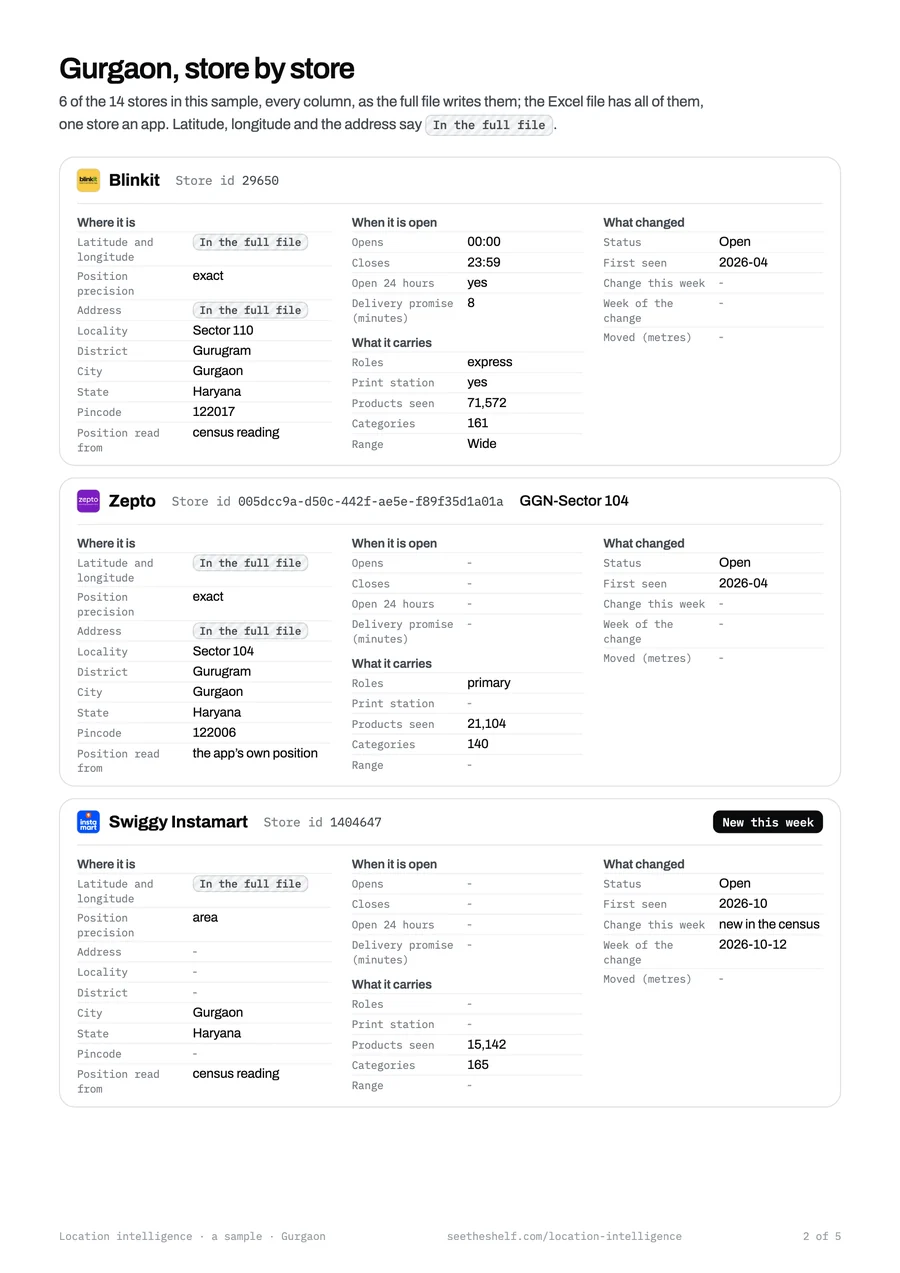
  • Page 2 of the sample: stores of Gurgaon, with every column

The sample

Gurgaon, every column.

Real stores of Gurgaon, one store an app across the apps there, with every column of the file, the week’s counts by app, and a page that explains each column. Positions and street addresses are held back: they are in the full file.

Who it is for

Who buys it.

Anyone whose decision depends on where the quick commerce stores are, and where they are going.

  • Retail and real estate

    Choose the next site

    Where each app has stores, by city, locality and pincode, and where new ones open: to place a shop, a kitchen or a warehouse where quick commerce already delivers.

    Where are the apps opening next?

  • Investors and analysts

    Follow the networks

    How each app’s store network grows week by week: new stores, closures and moves, app by app and city by city, in a file you can model.

    Is this app still opening stores, and where?

  • Brands planning distribution

    Plan where to supply

    Which cities and localities each app has stores in, with each store’s hours and delivery promise where the app states them: to plan where to list first and how to supply it.

    Which stores will my launch go through?

  • Last-mile and EV operators

    Put fleets near the stores

    Where the stores are, which say they are open all day and night, and where new ones appear: to place riders, charging and parking near them.

    Where should the next charging point go?

Prices

Two ways to buy it.

Monthly, to follow the stores every week. Or one time: the complete file of one week, yours to keep. Both include GST.

For teams who follow the network

Monthly

₹25,000 a month

GST included

Every store, every week, while you hold it.

  • Every store of the 22 apps, with every detail we have
  • Each week’s new, closed and moved stores
  • The map, and the stores by app, city and state
  • Each week’s file in Excel and CSV, opened within 24 hours of a short check
Choose monthly

For one study or one decision

One time

₹35,000 one time

GST included

The complete file of one week, yours to keep.

  • Every app, every store and every detail of that week
  • In Excel and CSV, yours to keep, opened within 24 hours of a short check
  • The screens for 30 days: the map, the stores and the week’s changes
Buy the file

Take it with any Shelf plan, or on its own: buying it never changes your plan. See it beside the plans

Questions about location intelligence

How often is it refreshed?

Every week. The screens and the file show what changed since the week before: new stores, closed stores and stores that moved. The grocery apps are counted again every week, the category apps once a month for now.

How are positions read, and what do exact, approximate and area mean?

Every position says how it was read. Most are the app’s own coordinate for the store or our census reading of it; the rest come from the centre of the area a store delivers to, the distances the app reports, or a public map listing the app confirms. Exact is within 250 metres and comes with the street address, approximate is within one kilometre, and area is further or not yet measured.

How is it different from Shelf’s brand plans?

The plans show what is on the shelf inside the stores: your products and your rivals’, in search and in the ads, with a store shown as its id, city, pincode and 1 km square. Location intelligence is the stores themselves: where each one is, its name and address, every detail we have, and what changed each week.

Can I take both, or only one?

Either, or both. Location intelligence sits beside any plan, Free, Pro or Pro Research, and buying it never changes your plan. It also works on its own, with a free account.

What do I keep with the one-time option?

The complete file of the week you buy: every app, every store and every detail, in Excel and CSV, yours to keep. The screens stay open for 30 days.

When do the Excel and CSV files open?

Within 24 hours of buying, after a short check. The screens open the moment you pay; for the files, you tell us on the Files screen who you are, what the files are for and that they stay inside your company, and we approve. This data is for use inside your company: reselling or sharing the raw data outside it is not allowed.

What counts as new, closed or moved?

New is a store in this week’s list that was not in last week’s, and likely newly opened when its id is newer than any the app had before. Closed means two readings agree it is gone; until then it is not answering. Moved is a changed position, given with its distance: a move, or a sharper reading of the same store.

Can I see it before I pay?

Yes. The sample is one city’s stores with every column, as a PDF and in Excel, with positions and street addresses held back. And signed in on any plan, Free included, the Location screens show the real counts by app, city and state and this week’s changes; the stores, their details, the map’s dots and the files open when you buy.

Is this the apps’ own list?

No. Shelf is independent and has no feed from any app. Every store is read from what the apps and public records show, store by store.

Every store, every week.

₹25,000 a month, or ₹35,000 one time for the week’s complete file. GST included.

Or start with the sample: one city, every column.