Product intelligence
See which categories have room, before you launch.
Every category on Blinkit, Zepto, Swiggy Instamart, Flipkart Minutes and BigBasket, set by how crowded its shelf is beside its signs of demand. Then one category in depth: who sells it, what sells by the app’s own marks, the price points nobody fills, and what a rival sells that you don’t.

- Swiggy Instamart 62
- BigBasket 60
- Blinkit 59
- Flipkart Minutes 24



By our own rule, the same for every category on every app.
Every app we read
Products on 22 apps, store by store.
The grocery apps and FirstClub, the apps for fashion, beauty, pharmacy, pets, baby and food, and DMart Ready, which delivers next day or in slots. Each app is read on its own and never added to another.




Fashion · Beauty · Pharmacy · Pets · Baby · Food












Next day and slots
Product research (room to enter, the price ladder, pack sizes) runs on Blinkit, Zepto, Swiggy Instamart, BigBasket and Flipkart Minutes. FirstClub and the category apps open category by category, brand by brand and store by store on a screen of their own. The category apps · Every app we read
In the product
What you see
- Niches with room
- Every category on an app, set by how crowded its shelf is beside its signs of demand, the ones with room to enter first. Our own rule, the same for every category.
- Who sells it
- The brands of a category, by their share of its listings, each with its middle price per 100 g, its discount, its stock at the read and its share of the ratings shown.
- What sells, by the app’s own marks
- The products the app itself marks most: by the ratings it prints, and on one app by its “sold” badge.
- Empty price points
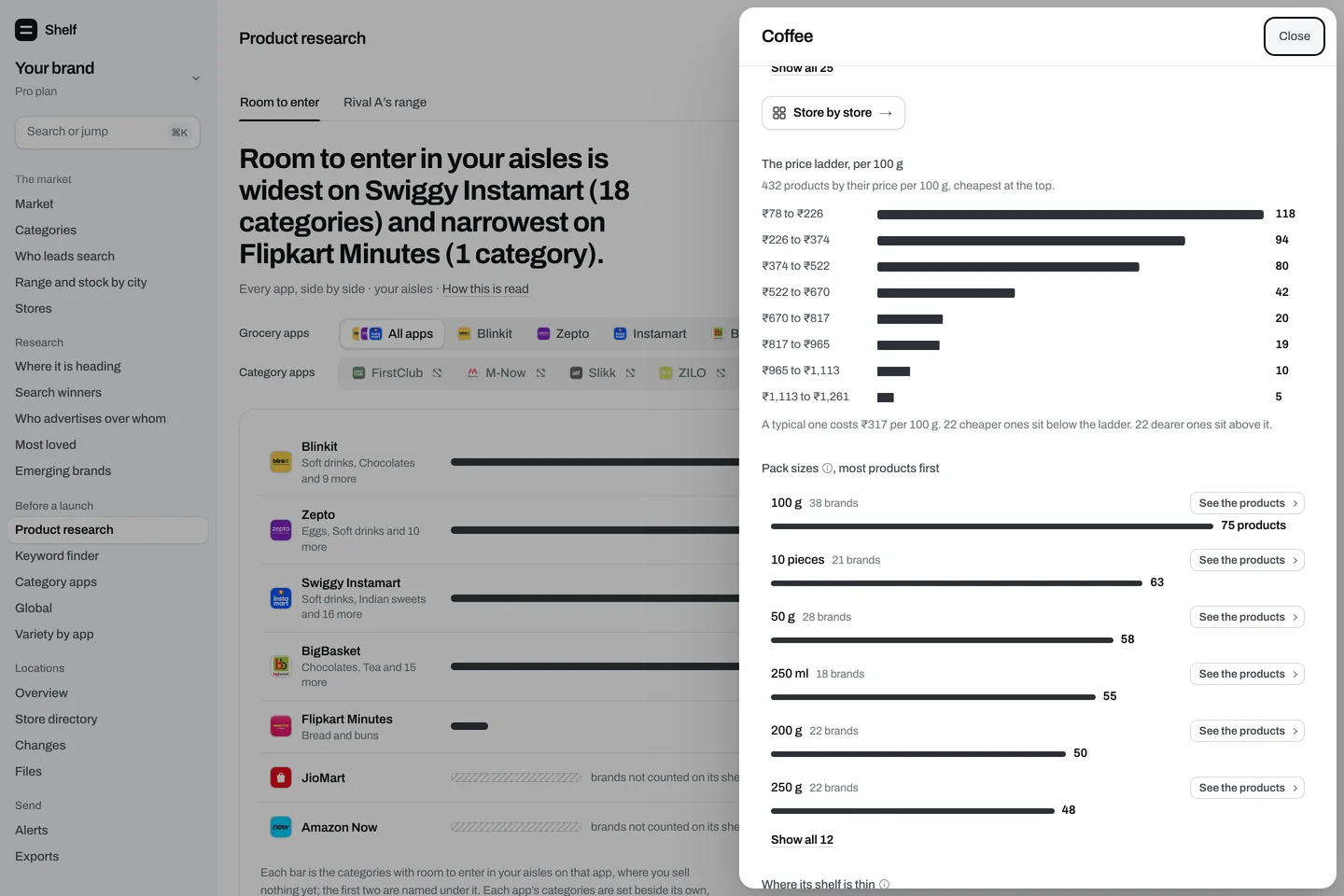
- The price ladder of a category, per 100 g, 100 ml or piece, in eight bands: where the shelf is crowded, and where a band sits empty between two full ones.
- Pack sizes
- The sizes a category sells in, with how many brands sell each one: the crowded sizes and the quiet ones.
- Where the shelf is thin
- The cities where an app carries the category in far fewer of its stores than it does across India.
- What a rival sells that you don’t
- A rival’s range beside yours, category by category: where it is and you are not, what you share, and what we first saw it selling at the latest read.
The screen
One category in depth.

From the read
An empty price point, as the screen shows it
The price ladder of one category on one app: eight bands of price per 100 g, and the band that sits nearly empty between two that are not.
Method
How we read it
- 1
From the same read as everything else
Every figure comes from the shelves we read store by store and the searches we run. Nothing is bought, estimated or taken from a seller panel.
- 2
Each category against the others
How crowded a shelf is and its signs of demand are a category’s place among the other categories on the same app, in thirds. The parts are listed on the methods page.
- 3
One app at a time
Apps differ in their shelves and their stores, so a category is read on each app by itself and never added across them.
Plans
What each plan includes
All of this is one product, Shelf: Pro opens every screen in full, and Free opens part of each. These are the rows for this page.
| What you see | Freeno card | Pro₹29,999 a month |
|---|---|---|
| Product research: niches to enter, a category in depth, a rival’s range against yours | The first 10 categories | Every category, and every brand in it |
Prices in rupees, per month, GST included. Pay once for 30 days, or turn on autopay and stop it any time. Compare every plan
Questions about product intelligence
How do I find a niche to enter on quick commerce?
Start with the categories where shoppers clearly want the product and no brand holds the shelf. Shelf sets every category on an app by two readings, how crowded its shelf is and its signs of demand, and lists the ones with room to enter first. Then read one category in depth: its brands, its price ladder and its pack sizes.
What does “room to enter” mean?
Our own filter, the same rule for every category: strong signs of demand on a shelf that is open or contested, or moderate signs on an open one. It compares a category with the others on the same app; it is not a forecast of sales.
What is an empty price point?
A band of the price ladder (the price per 100 g, 100 ml or piece, in eight equal bands from the cheapest twentieth to the dearest) that holds no product, or under 3% of them, between two bands that do. A gap on this shelf at this read, not a promise that shoppers want that price.
Can I see what a competitor sells that I don’t?
Yes. Set a rival’s range beside yours on one app: the categories it sells in and you do not, the ones you share, and its widest products with their price and reach.
Can I see what a competitor launched recently?
Yes, as first seen: the products that first appeared on the shelf at the latest read. First seen can come after a product’s launch, so Shelf never calls it a launch date.
Do I need a brand of my own to use it?
No. A founder or a researcher with no product sets up a research account and reads every category the same way.
Does it show sales?
No app publishes sales, and we never estimate them. Demand is shown as the signs the apps themselves show: how widely a category is carried, how deep its shelf is, and the ratings printed on its products.
How fresh is it?
Every store on the apps we read is read again every day (JioMart and Amazon Now twice a day), and every read is kept as history. Pro is refreshed every day, and every hour in your target cities once set up. Free is refreshed every week.
Keep reading
The rest of the product
- Ads intelligenceWhich brands hold the paid slots on your keywords and on your own name.
- Search intelligenceWhere you rank in the unpaid results, for each keyword in each city.
- Shelf intelligenceThe dark stores where a rival is on the shelf and you are not.
- Price intelligenceYour price beside a rival’s on each app, and what changed since the previous read.
- Location intelligenceEvery store of every app Shelf reads, refreshed every week: where each one is, every detail, and what changed.
- Alerts and filesEmail, Slack, your own webhook, and Excel or CSV of any table.
See the shelf, every day.
Every store read every day. Pick a category and see who leads it, what sells out, who ranks in its searches and who pays for its ads. Free.
No card and no seller login needed.